
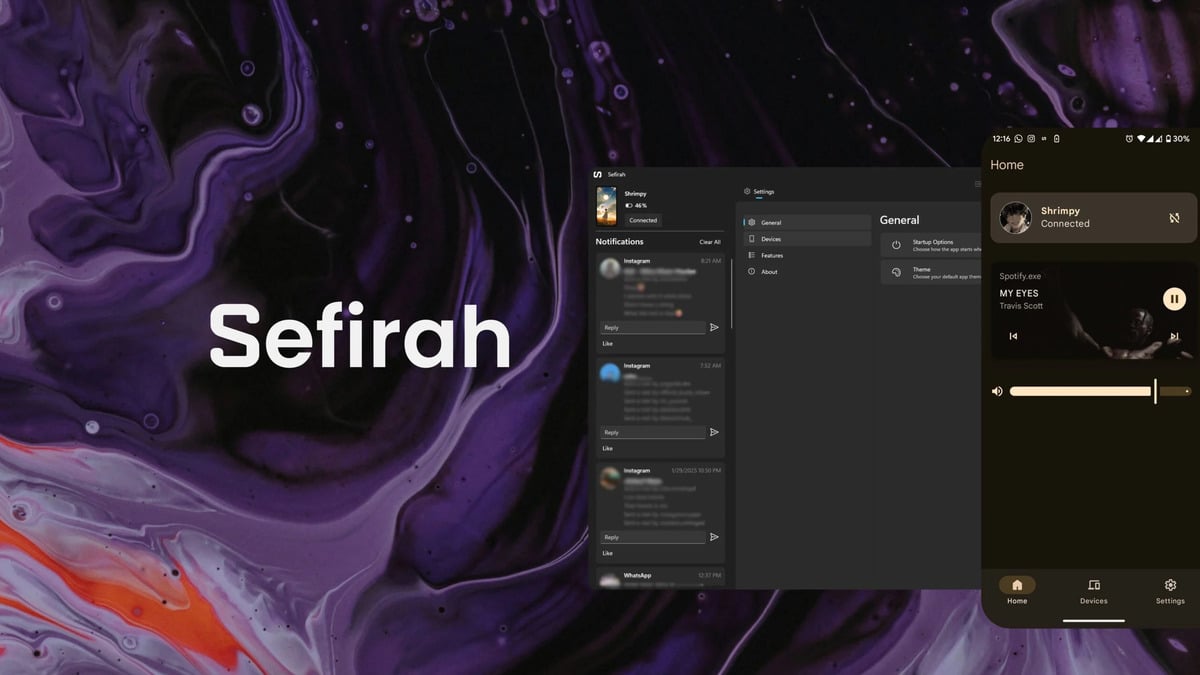
Microsoft’s Phone Link is designed to connect Android phones with Windows PCs, allowing users to receive notifications, send messages, make calls, and move content between devices. However, some of its more advanced features are limited to selected phones, including certain Samsung, Honor, and Microsoft devices.
An open-source alternative called Sefirah takes a different approach. It connects Android phones directly to Windows computers over the same local network, does not require an online account, and makes its features available without tying them to a particular phone brand.
No Microsoft Account Required
Sefirah is free and open source, with its code published on GitHub under the GPL-3.0 license. Its Android app is also available through Google Play.
Pairing is relatively simple. After installing Sefirah on both devices, the Android app searches for compatible computers on the same network. Users then approve the connection on the PC and choose where incoming files should be stored.
Unlike Phone Link, Sefirah does not depend on a cloud account. While the Google Play listing says transfers are protected using end-to-end TLS encryption, communication happens over the local network.
Copy, Paste and Send Files Between Devices
One of Sefirah’s main features is a shared clipboard. Text copied on a Windows PC can immediately be pasted on the connected Android phone, and the same works in reverse.
The app also supports file transfers between the two devices. While files can also be transferred from the PC, android users can send content through the normal Share menu.
More importantly, Sefirah can integrate an Android phone’s shared storage directly into Windows File Explorer. This allows users to browse and manage phone files from the PC instead of being limited to photos.
Calls, Messages and Screen Mirroring
Sefirah can display Android notifications on Windows and lets users view and send SMS messages from their computer.
Recent versions also backing phone calls through Windows using Bluetooth, including call history, dialing, answering calls, and controls such as mute, hold, and audio routing.
Screen mirroring is available through scrcpy, an open-source tool that lets users view and control an Android screen from a computer. Sefirah can also turn the phone into a remote control for media playback and PC volume.
Linux Support Is Available but Limited
Although its developers warn that some Windows features are not yet available there, sefirah also has a Linux version. There is currently no official macOS or iPhone version.
For Android users who want tighter Windows integration without a Microsoft account or phone-brand restrictions, Sefirah offers many of the same core features as Phone Link while adding full storage access and an open-source, local-first approach.
Stay Connected with ProPakistani
Get the latest tech news, telecom insights, and product launches wherever you prefer.
Related stories
Orkut Could Be Making a Comeback After 12 Years
Orkut, the once-popular social networking platform that shut down in 2014, could be making a comeback.

FIA Bars Offloading Passengers on Verbal Orders Alone
In practice, the Federal Investigation Agency (FIA) has issued a new 12-page standing order governing immigration procedures at airports, seaports and dry ports throughout…

Join Pakistan Navy as Civilian
Meanwhile, the Pakistan Navy has confirmed 57 civilian apprentice vacancies under Batch A-2027, allowing male Pakistani citizens with a Matric Science qualification to apply…

Civil Aviation Authority Announces Jobs With Monthly Salaries Up to Rs 13.73…
For context, the Pakistan Civil Aviation Authority (PCAA) has confirmed three job vacancies for experienced professionals, offering a monthly salary of up to Rs…